Cox
- 4.5
- Rating
- 1.00M
- Installs
- Free
- Price

 Analysis by App-foxy
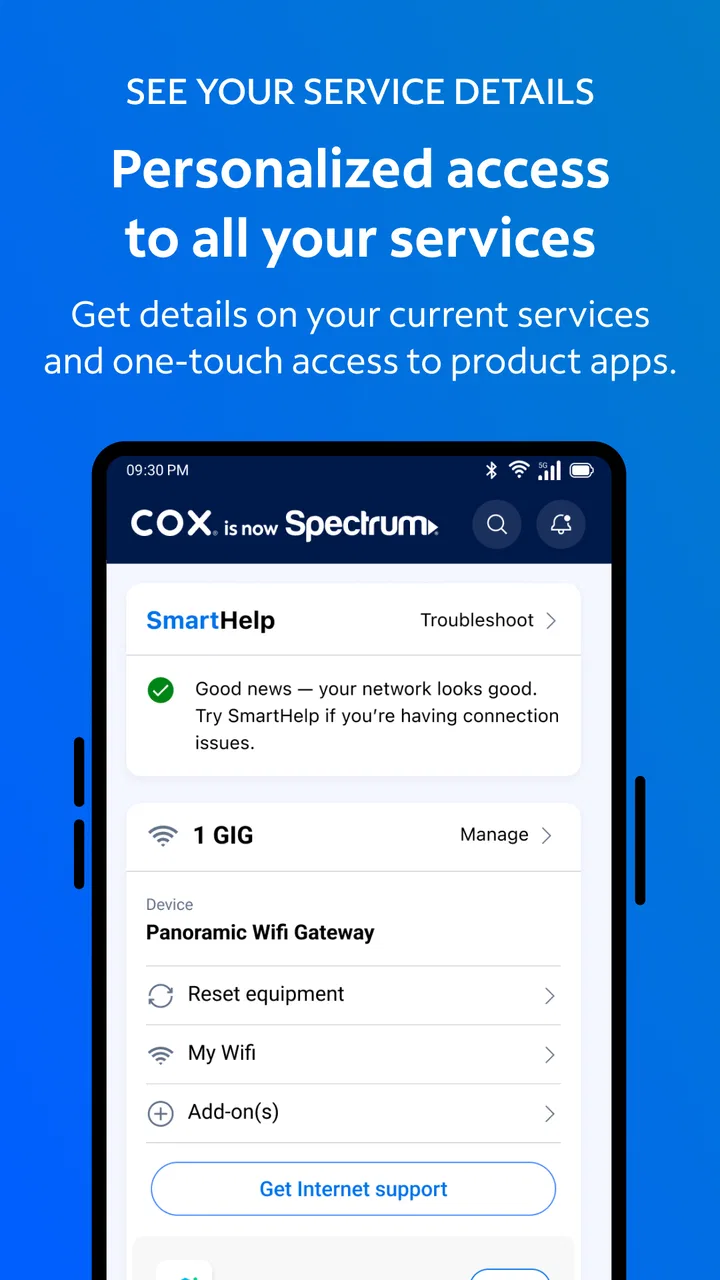
If you use Cox for internet, television, or other account services, the Cox app is best understood as a practical control panel rather than a general-purpose productivity tool. I found its value in bringing account and service information into one dashboard, so I could check the essentials without opening a browser and searching through several pages. It is free, aimed at Everyone, and developed by Cox Communications, Inc., which makes it a natural starting point for existing Cox customers rather than a useful download for people who do not have a Cox account.
The app sits in the productivity category, although its usefulness is very specific: it helps organize and view information connected to your Cox relationship. That distinction matters. I would not install it expecting a calendar, note-taking system, task manager, or office suite. I would install it when I want a more direct way to keep an eye on my services and account details. The store summary describes a dashboard view, and in everyday use that dashboard-first approach is the main reason to keep it on a phone.
What the Cox app is really like for a first-time user
My first impression is that the app is designed around reducing small bits of account friction. Instead of treating the phone as a miniature version of a full website, it focuses attention on the information a customer is most likely to check. That makes it easier to begin, especially when the immediate goal is simply to understand what is happening with a Cox service or account.
You May Also Like

 Blood Strike: 2.5 Anniversary
Blood Strike’s Loadouts Turn Every Drop Into a Tactical Gamble
A close look at Blood Strike’s custom loadouts: how fast access to signature weapons reshapes its battle royale rhythm, rewards preparation, and narrows the gap between fights.

 Pandora - Music & Podcasts
Pandora’s Music Is Easy to Start, but Harder to Recover
Pandora’s strength is its low-effort path from a seed to a station. Its weak spot is how much confidence it asks you to place in connection, setup, and quiet recovery.

 8 Ball Pool
 Is Built on Rivalries, Rematches, and Routine
A close look at the rivalries, rematches, shared routines, and unanswered safety questions that turn a quick pool match into a persistent mobile community.

 Samsung Music
’s Quiet Strength Is Playing What You Already Own
Its reach comes less from spectacle than from dependable access to a personal library. That simplicity is both the app’s strongest retention engine and its ceiling.

 AccuWeather: Weather Radar
AccuWeather Review: A Quick, Clear Forecast for Everyday Decisions
For everyday plans, the best forecast is the one you can understand quickly. AccuWeather makes rain timing, radar, and local conditions easy to act on, with a few trade-offs.

 Hill Climb Racing
Why Hill Climb Racing Still Turns Crashes Into One More Run
A tiny car, a bumpy hill and one more upgrade: Hill Climb Racing keeps resurfacing because its simple chaos makes every near-miss feel personal.
More From Our News Desk



The strongest use case is routine account awareness. You might be away from home and want to look at your service information, checking details before contacting support or making a decision. You might also be helping a family member who is the primary account holder and needs a simpler view than a desktop browser provides. In those moments, a dashboard can be more useful than a long settings menu.
There is also a useful psychological benefit to keeping this kind of information in a dedicated app. When account details are mixed into email, browser bookmarks, paper statements, and saved messages, it is easy to lose track of which information is current. A single Cox-branded place gives me a clearer starting point. The app is most valuable when it replaces uncertainty with a quick account check.
That said, I would not call it essential for every Cox customer. If you rarely need to inspect service information and are already comfortable using the Cox website, the app may not change your routine much. A website can still be preferable when I am working on a larger screen, comparing several pages, or handling a task that requires more room. The app earns its place when convenience on a phone matters more than having the broadest possible interface.
Its public reception suggests that many customers find this focused approach worthwhile. Cox has an average rating of 4.5 from around 164 thousand ratings, with more than 18 thousand written reviews and over 1 million installs. Those figures do not make the app perfect, but they do show that it has become a familiar account companion for a substantial number of users.
What to have ready before opening it
Before installing, I would make sure I know which Cox account I intend to use. This sounds obvious, but household accounts can be confusing when one person pays the bill, another manages the home network, and several people use the services. Starting with the correct account prevents the first session from becoming a search through old emails or messages.
I would also decide what I want to accomplish during the first visit. “I want to understand my account” is less useful than a concrete goal such as checking service information, reviewing the dashboard, or confirming that the app is showing the household account I expected. A narrow goal makes it easier to tell whether the app is working for me.
The app is free, so the decision to try it does not require a purchase commitment. It is suitable for Everyone, but that age label should not be confused with universal usefulness. The content rating describes who can use it; the practical audience is still mainly Cox customers who need access to account-related information.
Getting through the first setup without confusion
After installation, I would treat setup as an account-identification step rather than a feature tour. The important question is whether the app connects me to the right Cox relationship and presents information that makes sense for my household. If the account shown is not the one I expected, I would stop and resolve that before relying on anything displayed later.
This is especially important for people who have moved, changed services, or share responsibility for a household account. A dashboard is only helpful when its context is correct. Seeing a clean screen is not enough; I want to know that it belongs to the right customer profile and service arrangement.
One practical habit helped me: I would not rush through setup while distracted. I would keep the account credentials available, use a stable connection, and read each screen instead of tapping through automatically. That may sound slower, but it avoids the more frustrating situation where I reach the dashboard and then have to work backward to understand why the information does not match my expectations.
The current version is 3.69.0.3827, and the app requires Android 8.0 or later. For Android users with an older phone, checking compatibility before planning around the app is sensible. For people on a supported device, the main preparation is not technical; it is knowing which Cox account should be represented.
Your first meaningful success
I would define a successful first session as reaching the dashboard and using it to answer one real question about my Cox account. That might be confirming that the correct services are associated with the account, locating the information I expected to see, or simply learning where the important account details live. The point is to leave with a useful answer, not merely to finish installation.
Once the dashboard is visible, I recommend pausing for a moment and identifying its main areas before opening everything. Look for the information that relates directly to your immediate reason for installing the app. If you downloaded it because you were unsure about a service detail, start there. If you opened it to get familiar with the account, scan the dashboard and note which sections you would return to later.
This approach is more efficient than exploring randomly. Account apps can contain labels that feel obvious to the company but less obvious to a customer. By connecting each screen to a question, I can tell whether I have found the right place or merely opened a related section. It also gives me a repeatable routine for future visits.
A realistic example is a busy evening when someone in the household asks whether the Cox account information matches the services currently being used. Rather than searching through a laptop, I would open the app, check the dashboard, and use the displayed account context as my starting point. If the information answers the question, the app has already delivered its main benefit: less interruption during an ordinary task.
Another useful scenario is helping a relative who is not comfortable navigating websites. I would first verify that the correct account is active, then show them where the central information appears. The app may not remove every need for support, but a focused dashboard can make the first conversation much less overwhelming than sending someone through a full website menu.
Where first-time users can misread the experience
The biggest possible confusion is expecting the app to behave like a complete replacement for every Cox interaction. Its central promise is visibility into important account and service information. That is different from promising that every customer need will be handled in one place. I would begin with the dashboard and treat it as an information hub, not assume that every specialized request will follow the same path.
Another source of friction is the difference between account information and device-level troubleshooting. If I am trying to understand something about my account, the app is a logical first stop. If I am dealing with a complicated technical problem involving equipment, connections, or a home setup, I would not assume that a dashboard alone will explain the cause. The app can help orient me, but it should not replace practical diagnosis when the problem is physical or network-specific.
It is also easy to confuse convenience with completeness. A phone dashboard is excellent for a quick check, but a browser may still be better when I need to read a lot of detail, compare information side by side, or work through a longer process. I prefer the app for short visits and the website for tasks that demand more space. That is not a flaw unique to Cox; it is the trade-off of managing account information on a small screen.
Notifications and saved shortcuts can also create false confidence if the information is old or taken out of context. My habit would be to use the app as the current place to inspect the account rather than relying on a screenshot or memory from a previous visit. When something matters, I would read the full context shown in the app before making a decision.
Finally, households should agree on who is supposed to use the account. If several people sign in with different credentials, the experience may not look identical from one phone to another. Before concluding that information is missing, I would check whether the correct Cox account and user context are active. That simple check can prevent unnecessary troubleshooting.
How it compares with the usual alternatives
The obvious alternative is the Cox website. In my view, the website is the better choice when I want a wider layout, more room for detailed reading, or a desktop workflow. The app is the better choice when I am standing in a hallway, sitting in a car before an appointment, or handling a quick household question. It reduces the number of steps between opening my phone and reaching account information.
Email and paper records serve a different purpose. They can preserve messages and statements, but they are poor substitutes for a dashboard when I want a current overview. Searching an inbox often means guessing the right subject line or date. The app gives me a dedicated place to begin, which is particularly useful when I do not remember when a particular account message arrived.
General browser bookmarks are also less focused. A bookmark can take me to Cox, but it does not by itself solve the problem of signing in, finding the right page, and remembering where the relevant information is located. The app’s advantage is not that it makes Cox services fundamentally different; it is that it packages the account entry point for repeated mobile use.
On the other hand, people who manage several unrelated providers may prefer keeping everything in a browser or a personal organization system. Installing a separate app for every utility can make a phone feel cluttered. I would choose Cox when the account is important enough to check regularly, not simply because a dedicated app exists.
Small habits that make the app more useful
My first tip is to use the dashboard as a starting checklist. Each time I open the app for a specific reason, I would first confirm the account context, then look for the relevant service information, and only afterward move into a deeper section if needed. This prevents me from wandering through menus before verifying that I am looking at the right account.
My second tip is to keep the app for recurring checks rather than one-time curiosity. The real advantage appears when I return to the same place over time and become familiar with its layout. A first visit teaches me where information lives; later visits become faster because I no longer need to search mentally for the route.
My third tip is to use the app before contacting support when the question is about account context. I would check what the dashboard shows, note the wording of the relevant information, and then explain the situation clearly if I still need help. That creates a more precise support conversation than saying only that something “looks wrong.”
A fourth trade-off is worth remembering: the app’s simplicity can be a strength for quick checks but a weakness for complex research. If I need to compare several details or read extensive explanations, I would switch to a larger screen instead of forcing the phone experience to do a job it is not suited for.
Who should use Cox, and who should skip it
I would recommend Cox to existing Cox customers who want a convenient mobile view of important account and service information. It is especially suitable for people who frequently manage household services from a phone, help another family member with account questions, or want a dedicated alternative to repeatedly navigating a browser.
I would also recommend it to first-time app users who prefer a focused experience. The dashboard concept is easier to understand when the goal is clear, and the free price makes trying it straightforward. The app is not asking me to learn a new productivity system; it is giving me a more direct way to approach a Cox account.
I would skip it if I am not a Cox customer, if I almost never need account information, or if I strongly prefer handling everything on a desktop. I would also choose the website first for complicated tasks that require extensive reading or a broader view. In those cases, the app may add another place to manage rather than genuinely simplify my routine.
My next-step recommendation
After the first successful dashboard check, I would use the app once more for a different everyday question. That second visit tells me whether it fits my habits or was useful only because of a single situation. If I can return quickly to the account information I care about, the app has earned a permanent place on my phone.
For a first-time user, my advice is simple: install it with one clear goal, confirm that the correct Cox account is represented, and judge it by how quickly it helps answer that goal. Do not expect it to replace every Cox interaction or every browser task. Instead, use it as a focused mobile companion for account awareness.
Overall, I see Cox as a sensible productivity app for a very specific audience. It does not need to be flashy to be useful. Its strength is the direct path from phone to account dashboard, while its limitation is that a focused dashboard cannot provide the spaciousness and flexibility of a full website. If that balance matches the way you manage Cox services, this free app is worth trying.
FAQs for Cox
01What is the Cox app used for?
The Cox app is designed for Cox customers who want to manage their internet, television, home phone, and related services from a mobile device. After signing in, you can review your account, check or pay bills, monitor service details, manage equipment, view support information, and access certain entertainment features. The exact options available may depend on your Cox plan, location, and account type.
02Do I need a Cox account to use the app?
Yes, most account-management features require an active Cox account and valid sign-in credentials. The app generally uses the same username and password associated with your Cox services, so you do not normally need to create a separate mobile account. Customers without Cox service may be able to view limited information, but billing, equipment management, troubleshooting, and personalized features require account access.
03Can I pay my Cox bill and manage billing through the app?
The app provides convenient billing tools for eligible Cox customers. You can typically view your current balance, review billing information, make a payment, and manage selected payment preferences. Before confirming a transaction, carefully check the amount and payment method shown on screen. Some billing options, account changes, or payment arrangements may still require using the Cox website or contacting customer support.
04Can the Cox app help troubleshoot internet or equipment problems?
Yes, one of the app’s useful functions is guided support for common Cox service issues. Depending on your equipment and plan, it may help you check service status, restart or manage certain devices, run basic diagnostics, and follow troubleshooting steps for connection problems. It cannot fix every issue remotely, however, and outages, damaged equipment, or complex account problems may require Cox technical support.
05Is the Cox app free to download, and what devices are supported?
The Cox app is generally free to download, although you must have qualifying Cox services to use many of its features. It is intended for compatible Android and iOS smartphones or tablets, but supported operating-system versions can change as the app is updated. For the best experience, install the latest version available from the official Google Play Store or Apple App Store and use a reliable internet connection.
Pros
- Reliable cable
- internet
- and phone service management in one app
- Quick access to billing details and payment history
- Useful outage updates and service-status information
- Easy appointment tracking for technician visits
- Supports account management for multiple Cox services
Cons
- Some features may require a Cox customer account
- App performance can vary during outages or peak periods
- Certain account changes may still require contacting support
- Notifications may be inconsistent on some devices
- Availability of features depends on your Cox services and region

Cox
Gallery